

In the dynamic world of printing technology, compatibility is a crucial factor that can significantly impact the efficiency and performance of printing equipment. As a supplier of the Ricoh G5i print head, I often encounter questions from customers regarding its compatibility with Mac computers. In this blog post, I will delve into the details of this topic, providing you with comprehensive information to help you make an informed decision.
Understanding the Ricoh G5i
Before we discuss compatibility, let's first understand what the Ricoh G5i is. The Ricoh G5i is a high - performance inkjet print head known for its precision, speed, and excellent print quality. It is widely used in various printing applications, including textile printing, wide - format printing, and industrial printing. With its advanced technology, the Ricoh G5i can deliver sharp images and consistent results, making it a popular choice among printers.
Compatibility Factors
When it comes to the compatibility of the Ricoh G5i with Mac computers, several factors need to be considered.
1. Driver Support
One of the most critical aspects of compatibility is driver support. A driver is a software program that allows the computer to communicate with the print head. For the Ricoh G5i to work smoothly with a Mac, there must be a compatible driver available.
Ricoh, the manufacturer of the G5i, usually provides driver support for different operating systems, including macOS. However, it is essential to ensure that you are using the latest version of the driver. Outdated drivers may cause compatibility issues, such as print errors, slow printing speed, or even the inability to connect the print head to the computer.
You can usually find the latest drivers on the official Ricoh website. It is recommended to regularly check for driver updates to ensure optimal performance.
2. Operating System Version
The version of the macOS installed on your computer also plays a significant role in compatibility. Newer versions of macOS may have different system requirements and security features compared to older versions.
The Ricoh G5i is designed to be compatible with a range of macOS versions. However, it is advisable to check the official documentation or contact Ricoh's technical support to confirm the specific macOS versions that are fully supported. For example, if you are using an extremely old version of macOS, there may be compatibility issues due to software and hardware limitations.
3. Hardware Requirements
In addition to software compatibility, the hardware of your Mac computer also needs to meet certain requirements. The Ricoh G5i requires a certain level of processing power, memory, and bandwidth to function properly.
A Mac with a low - end processor or insufficient memory may struggle to handle the data processing required for high - quality printing. It is recommended to have a Mac with at least an Intel Core i5 or equivalent processor and 8GB or more of RAM. Also, ensure that your Mac has the appropriate ports to connect the Ricoh G5i. Most modern Macs come with USB or Thunderbolt ports, which can be used to connect the print head.
Testing and Troubleshooting
If you are unsure whether the Ricoh G5i is compatible with your Mac, you can perform some simple tests.
First, try to connect the Ricoh G5i to your Mac using the appropriate cable. If the Mac recognizes the print head, it is a good sign that basic compatibility is established. You can then try to install the driver and run some test prints.
If you encounter any problems during the installation or printing process, here are some troubleshooting steps:
- Check the connections: Make sure that the cables are properly connected and there are no loose connections.
- Update the driver: As mentioned earlier, an outdated driver can cause compatibility issues. Try to download and install the latest driver from the official Ricoh website.
- Restart the computer and the print head: Sometimes, a simple restart can resolve minor software glitches.
- Contact technical support: If the problem persists, you can contact Ricoh's technical support or our support team as a Ricoh G5i supplier. We have experienced technicians who can provide you with more in - depth troubleshooting guidance.
Comparison with Other Print Heads
To give you a better perspective, let's compare the Ricoh G5i with other popular print heads in terms of Mac compatibility.
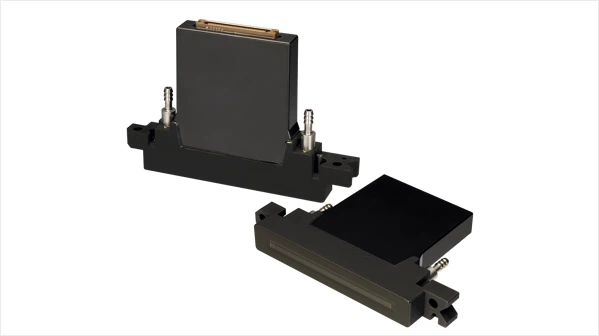

The Konica 1024 is another well - known print head in the market. Similar to the Ricoh G5i, it also requires proper driver support and hardware compatibility to work with Mac computers. However, the specific driver requirements and compatibility details may vary.
The Ricoh G5 and Ricoh G6 are also from the same family as the Ricoh G5i. The G5 and G6 may have different features and performance levels, but in general, they follow similar compatibility rules when it comes to Mac computers. The key is to ensure that you have the correct driver and that your Mac meets the necessary hardware and software requirements.
Conclusion and Call to Action
In conclusion, the Ricoh G5i is generally compatible with Mac computers, provided that you meet the driver, operating system, and hardware requirements. By following the guidelines mentioned in this blog post, you can ensure a smooth printing experience with your Mac and the Ricoh G5i.
If you are interested in purchasing the Ricoh G5i or have any further questions about its compatibility with Mac computers, please feel free to contact us. We are a professional Ricoh G5i supplier, and our team of experts is ready to provide you with detailed product information and support. Whether you are a small - scale printer or a large - scale printing enterprise, we can offer you the best solutions to meet your printing needs.
References
- Ricoh official documentation on the G5i print head.
- Mac OS official documentation on hardware and software requirements.