

Hey there! As a supplier of the Ricoh G5i, I've seen firsthand how crucial it is to get the best print quality out of this amazing piece of equipment. In this blog, I'm gonna share some tips and tricks on how to optimize the print quality of the Ricoh G5i.
Understanding the Ricoh G5i
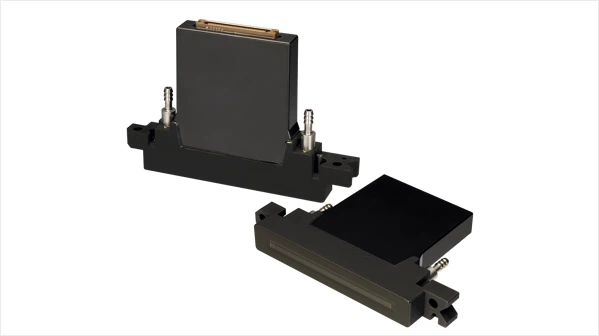
Before we dive into the optimization process, let's take a quick look at what makes the Ricoh G5i so special. The Ricoh G5i is a high - performance inkjet print head that offers excellent reliability and precision. It's widely used in various printing applications, from textile printing to signage.
Compared to other print heads like the Ricoh G5 and the Ricoh G6, the G5i has its own unique features. It provides a good balance between speed and print quality, making it a popular choice for many printers. And when you stack it up against the Konica 1024, the Ricoh G5i often stands out with its consistent performance.
Ink Selection
One of the most important factors in optimizing print quality is the ink you use. You gotta choose the right ink for the Ricoh G5i. First of all, make sure the ink is compatible with the print head. Using incompatible ink can lead to clogging, uneven printing, and even damage to the print head.
There are different types of inks available, such as solvent - based, water - based, and UV - curable inks. Solvent - based inks are great for outdoor applications as they offer good durability. Water - based inks are more environmentally friendly and are often used in textile printing. UV - curable inks dry quickly under UV light, which is perfect for high - speed printing.

When selecting ink, also pay attention to the ink's viscosity. The viscosity of the ink affects how it flows through the print head. If the viscosity is too high, the ink may not flow smoothly, causing inconsistent printing. On the other hand, if the viscosity is too low, the ink may spread too much on the printing surface, resulting in blurry images.
Print Head Maintenance
Proper print head maintenance is key to getting top - notch print quality. Regular cleaning is a must. Over time, ink residues can build up inside the print head, which can affect the ink flow and cause print defects.
You can use a cleaning solution specifically designed for the Ricoh G5i to clean the print head. Follow the manufacturer's instructions carefully when cleaning. Usually, you'll need to soak the print head in the cleaning solution for a certain period of time and then gently flush it with clean water.
Another important aspect of print head maintenance is keeping it at the right temperature. The Ricoh G5i works best within a specific temperature range. If the temperature is too high or too low, it can affect the ink's properties and the performance of the print head. Some printers come with a temperature control system to keep the print head at the optimal temperature.
Printer Settings
Adjusting the printer settings correctly is also essential for optimizing print quality. Start by setting the right resolution. A higher resolution will give you a more detailed and sharp print, but it will also slow down the printing speed. So, you need to find a balance based on your specific printing needs.
The dot size is another setting that you can play around with. Different dot sizes can create different effects. Smaller dots can produce a smoother and more detailed print, while larger dots are better for bold and vivid colors.
You also need to adjust the print speed. Printing too fast can result in poor print quality, as the ink may not have enough time to dry properly or may not be deposited evenly. On the other hand, printing too slowly can be a waste of time and resources.
Printing Surface Preparation
The surface you're printing on can have a big impact on the print quality. Make sure the printing surface is clean and dry before printing. Any dust, dirt, or moisture on the surface can cause the ink to spread unevenly or not adhere properly.
For some printing surfaces, you may need to use a primer. A primer can help the ink adhere better to the surface and improve the overall print quality. For example, when printing on plastic, using a plastic primer can make a huge difference in the durability and appearance of the print.
Environmental Conditions
The environment where you're printing also matters. Humidity and temperature can affect the ink drying time and the performance of the print head. High humidity can cause the ink to dry more slowly, which may lead to smudging. Low humidity, on the other hand, can cause the ink to dry too quickly, resulting in clogging.
Try to keep the printing environment at a stable temperature and humidity level. If possible, use a climate - controlled room for printing. This will help ensure consistent print quality and reduce the risk of print defects.
Regular Testing and Calibration
Don't just set up the printer and forget about it. Regular testing and calibration are necessary to maintain optimal print quality. Print test patterns regularly to check for any issues such as clogging, misalignment, or color accuracy.
If you notice any problems in the test patterns, you can adjust the printer settings accordingly. Calibration can also help ensure that the colors are accurate and that the print head is firing the ink correctly.
Troubleshooting Common Issues
Even with proper maintenance and optimization, you may still encounter some common issues. One of the most common problems is clogging. If you notice that some nozzles are not firing or that the print is uneven, it could be a sign of clogging. You can try using the cleaning function on the printer or perform a more thorough cleaning of the print head.
Another issue is color inaccuracy. If the colors in your print don't match the original image, you may need to adjust the color settings on the printer or calibrate the color profile.
Conclusion
Optimizing the print quality of the Ricoh G5i takes a bit of effort, but it's definitely worth it. By choosing the right ink, maintaining the print head, adjusting the printer settings, preparing the printing surface, controlling the environmental conditions, and performing regular testing and calibration, you can achieve excellent print quality.
If you're looking to purchase the Ricoh G5i or need more advice on optimizing its print quality, feel free to reach out to me. I'm here to help you get the most out of this great print head.
References
- Ricoh G5i product manual
- Industry reports on inkjet printing technology
- Research papers on print quality optimization in inkjet printers