

As a supplier of Ricoh G6 printheads, I've seen firsthand the importance of maximizing their service life. The Ricoh G6 printhead is a high - performance component widely used in the printing industry, known for its precision and reliability. However, like any sophisticated piece of equipment, it requires proper care and maintenance to ensure it functions optimally over an extended period. In this blog, I'll share some valuable tips on how to extend the service life of your Ricoh G6 printhead.
1. Use High - Quality Ink
The quality of the ink you use has a direct impact on the printhead's lifespan. Low - quality inks may contain impurities, such as large particles, which can clog the nozzles of the Ricoh G6 printhead. These clogs can lead to uneven printing, reduced print quality, and eventually, permanent damage to the printhead.
When selecting ink, choose products that are specifically formulated for use with Ricoh G6 printheads. These inks are designed to have the right viscosity, surface tension, and chemical properties to ensure smooth flow through the nozzles. They also have a lower risk of causing corrosion or other chemical damage to the delicate internal components of the printhead.
2. Maintain Optimal Environmental Conditions
The environment in which the printer operates plays a crucial role in the longevity of the Ricoh G6 printhead. Extreme temperatures and humidity can cause the ink to dry out too quickly or form condensation inside the printhead, both of which can lead to nozzle blockages.
Keep the printer in a temperature - controlled environment, ideally between 20 - 25 degrees Celsius (68 - 77 degrees Fahrenheit). The relative humidity should be maintained at around 40 - 60%. Additionally, protect the printer from dust and debris, as these can also enter the printhead and cause problems. Regularly clean the printer's surrounding area and use air filters if necessary.
3. Implement Regular Cleaning Procedures
Regular cleaning is essential to prevent ink buildup and clogging in the Ricoh G6 printhead. Most printers come with built - in cleaning functions that can be used to flush out the nozzles with cleaning solution. Follow the manufacturer's instructions carefully when performing these cleaning cycles.
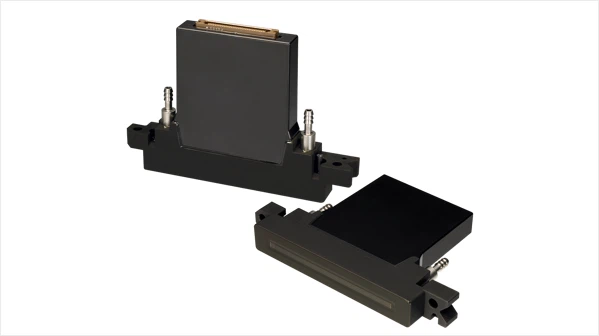

In addition to the automatic cleaning functions, it's also a good idea to perform manual cleaning periodically. This can involve removing the printhead and gently wiping the nozzles with a soft, lint - free cloth dampened with cleaning solution. However, be extremely careful when handling the printhead to avoid damaging it.
4. Properly Store the Printhead
If you need to store the Ricoh G6 printhead for an extended period, it's important to do it correctly. First, make sure the printhead is clean and free of ink. Then, store it in a sealed container with a small amount of cleaning solution to prevent the nozzles from drying out.
Keep the container in a cool, dry place away from direct sunlight and extreme temperatures. When you're ready to use the printhead again, follow the proper re - installation and priming procedures to ensure it functions properly.
5. Avoid Frequent On - Off Cycling
Frequent turning on and off of the printer can put additional stress on the Ricoh G6 printhead. Each time the printer is powered on, the printhead goes through a series of startup procedures, including priming the ink channels. Repeated cycling can cause wear and tear on the internal components of the printhead.
If you're not going to use the printer for a short period, it's better to leave it in standby mode rather than turning it off completely. This way, the printhead remains in a ready state and is less likely to experience problems.
6. Monitor Printhead Performance
Regularly monitor the performance of the Ricoh G6 printhead. Check for signs of uneven printing, missing dots, or other print quality issues. If you notice any problems, address them immediately. Early detection of issues can prevent further damage to the printhead and extend its service life.
Many printers come with software that allows you to monitor the status of the printhead, including nozzle health and ink levels. Use this software to keep track of the printhead's performance and schedule maintenance as needed.
7. Compare with Other Printheads
It's also beneficial to understand how the Ricoh G6 printhead compares with other popular printheads in the market, such as the Ricoh G5, Konica 1024, and Konica 1024i. While each printhead has its own unique features and advantages, the Ricoh G6 is known for its high - speed printing and excellent print quality. By understanding these differences, you can better appreciate the value of the Ricoh G6 and take appropriate measures to maintain it.
The Ricoh G5, for example, is also a reliable printhead but may have different ink requirements and performance characteristics compared to the G6. The Konica 1024 and Konica 1024i are well - regarded in the industry for their precision and durability. However, the Ricoh G6 offers a combination of speed and quality that makes it a popular choice for many printing applications.
Conclusion
Extending the service life of the Ricoh G6 printhead requires a combination of proper ink selection, environmental control, regular cleaning, and careful monitoring. By following the tips outlined in this blog, you can ensure that your printhead operates at its best for years to come.
As a supplier of Ricoh G6 printheads, I'm committed to providing you with the best products and support. If you have any questions about the Ricoh G6 printhead or need assistance with maintenance and troubleshooting, I encourage you to reach out. Whether you're a small - scale printer operator or a large - scale printing business, I'm here to help you make the most of your investment in the Ricoh G6 printhead. Contact me to discuss your procurement needs and how we can work together to achieve your printing goals.
References
- Manufacturer's manual for Ricoh G6 printhead
- Industry research on inkjet printhead maintenance
- Technical documents on environmental factors affecting printhead performance