

Hey there! As a supplier of the Konica 1024i, I often get asked all sorts of questions about this nifty piece of kit. One question that pops up quite a bit is, "Does the Konica 1024i have a touch - screen interface?" Well, let's dive right in and find out.
First off, let me give you a bit of background on the Konica 1024i. The Konica 1024i is a high - performance inkjet print head that's used in a variety of printing applications. It's known for its reliability, precision, and ability to produce high - quality prints. Whether you're in the textile industry, packaging, or any other field that requires top - notch printing, the Konica 1024i is a popular choice.
Now, back to the touch - screen interface question. The Konica 1024i itself doesn't come with a built - in touch - screen interface. It's a print head, and its main function is to eject ink droplets onto the printing surface with extreme accuracy. However, the printing systems that incorporate the Konica 1024i can be equipped with touch - screen interfaces.
Many modern printing systems are designed to be user - friendly, and a touch - screen interface is a great way to achieve that. With a touch screen, operators can easily control various aspects of the printing process, such as adjusting print settings, changing the ink type, or monitoring the status of the print head. It simplifies the operation and reduces the learning curve for new users.
Let's compare the Konica 1024i with another popular print head, the Ricoh G6. The Ricoh G6 also doesn't have a touch - screen interface on its own. But similar to the Konica 1024i, the printing systems that use the Ricoh G6 can be outfitted with touch - screen controls. The choice between the two often comes down to the specific requirements of the printing job. The Konica 1024i might be better suited for some applications, while the Ricoh G6 could be the preferred option for others.
When it comes to the Konica 1024, which is related to the Konica 1024i, it also operates in a similar way. It's a workhorse in the printing world, and like its cousin, the 1024i, it relies on external control systems that may or may not have touch - screen interfaces.
So, if you're in the market for a printing system that uses the Konica 1024i and you're really keen on having a touch - screen interface, you'll need to look at the overall printing system rather than just the print head. Many manufacturers offer customizable options, allowing you to choose the type of control interface that suits your needs.
Another aspect to consider is the software that comes with the printing system. A good software package can enhance the user experience, whether you have a touch - screen interface or not. It can provide advanced features like print preview, job scheduling, and remote monitoring. Some software even allows you to control the printing system from your mobile device, which is super convenient.
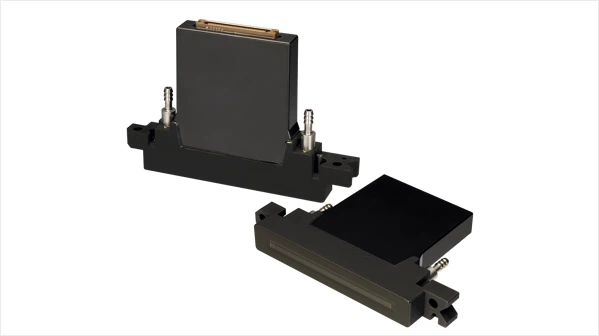

In terms of maintenance, the Konica 1024i is relatively easy to take care of. Regular cleaning and proper ink management are key to keeping it in top shape. And if your printing system has a touch - screen interface, it can make the maintenance process even smoother. You can access diagnostic tools and alerts right on the screen, which helps you catch any potential issues early on.
Now, let's talk about why the Konica 1024i is such a great choice for printing. Its high - resolution printing capabilities mean that you can achieve sharp, detailed prints. It also has a high - speed operation, which is crucial for large - scale printing jobs. The ink ejection technology used in the Konica 1024i ensures consistent and reliable performance over time.
If you're thinking about purchasing a printing system with the Konica 1024i, it's important to do your research. Look at different manufacturers and their offerings. Compare the features, prices, and support services. And don't forget to consider the touch - screen interface if that's important to you. You can also talk to other users or industry experts to get their insights and recommendations.
As a supplier, I've seen firsthand the benefits that the Konica 1024i brings to printing businesses. It can really boost productivity and the quality of the final product. Whether you're a small - scale printer or a large - scale industrial operation, the Konica 1024i has something to offer.
So, if you're interested in learning more about the Konica 1024i or discussing your printing needs, feel free to reach out. We can have a chat about how the Konica 1024i can fit into your existing setup or help you build a new printing system from scratch. Whether you're looking for a touch - screen - enabled system or not, we've got the expertise to assist you.
In conclusion, while the Konica 1024i itself doesn't have a touch - screen interface, the printing systems that use it can be equipped with one. It's all about finding the right combination of hardware and software to meet your specific printing requirements. If you're ready to take your printing to the next level, let's start a conversation and see how we can make it happen.
References:
- Industry knowledge and experience as a Konica 1024i supplier.
- General information about inkjet print heads and printing systems.