

Hey there! As a supplier of the Ricoh G6, I often get asked a bunch of questions about this amazing print head. One of the most common questions I hear is, "Can Ricoh G6 print on plastic sheets?" Well, let's dive right into it and find out!
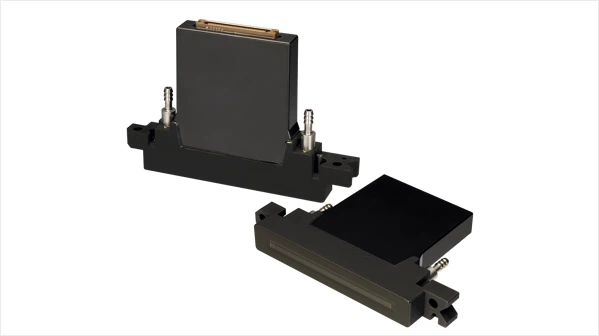
First off, let's talk a bit about the Ricoh G6 itself. The Ricoh G6 is a high - performance print head that has been making waves in the printing industry. It's known for its precision, speed, and ability to handle a variety of inks. With its advanced technology, it can produce high - quality prints with sharp details and vibrant colors.
Now, when it comes to printing on plastic sheets, there are a few factors we need to consider.
Compatibility of Inks
The type of ink you use is crucial. For printing on plastic, you generally need a special type of ink that can adhere well to the non - porous surface of the plastic. Solvent - based inks are often a good choice. They have excellent adhesion properties and can form a strong bond with the plastic. UV - curable inks are another option. These inks dry almost instantly when exposed to UV light, which can prevent smudging and ensure a durable print.
The Ricoh G6 is compatible with a wide range of inks, including solvent - based and UV - curable inks. This means that in theory, it has the potential to print on plastic sheets. But it's not just about the ink being compatible with the print head; it also needs to work well with the specific type of plastic you're using.
Types of Plastic Sheets
There are various types of plastic sheets out there, such as PVC (Polyvinyl Chloride), PET (Polyethylene Terephthalate), and acrylic. Each type has its own surface characteristics, which can affect how well the ink adheres.
- PVC: PVC is a popular choice for printing because it's relatively easy to work with. It has a slightly porous surface compared to some other plastics, which can help the ink adhere better. The Ricoh G6 can definitely print on PVC sheets when using the right ink. For example, solvent - based inks can penetrate the surface of the PVC slightly, creating a strong bond.
- PET: PET is a more rigid and less porous plastic. It requires a more aggressive ink system or some form of surface treatment to ensure good adhesion. UV - curable inks are often a better option for PET. The Ricoh G6 can handle these inks effectively, but you might need to do some test prints to optimize the settings.
- Acrylic: Acrylic is a smooth and non - porous plastic. Printing on acrylic can be a bit more challenging. You may need to use a primer or a special coating on the acrylic surface to improve ink adhesion. Once the surface is properly prepared, the Ricoh G6 can produce great results with UV - curable inks.
Printer Settings
In addition to the ink and the type of plastic, the printer settings also play a crucial role. You need to adjust the print speed, dot size, and ink density according to the characteristics of the plastic sheet.
- Print Speed: If you print too fast, the ink may not have enough time to adhere properly to the plastic. On the other hand, if you print too slowly, it can be time - consuming and may cause over - saturation of the ink. You'll need to find the right balance for the specific plastic and ink combination you're using.
- Dot Size: The dot size determines the resolution and the amount of ink deposited on the plastic. For a high - quality print, you may need to adjust the dot size based on the surface smoothness of the plastic. A smaller dot size can be used for smoother plastics to achieve finer details.
- Ink Density: Adjusting the ink density is important to ensure that the colors are vibrant and the print is opaque enough. You may need to increase the ink density for darker colors or when printing on light - colored plastics.
Comparison with Other Print Heads
It's also interesting to compare the Ricoh G6 with other popular print heads in terms of printing on plastic sheets. The Konica 1024 and Konica 1024i are well - known in the industry.
The Konica 1024 and 1024i are also capable of printing on plastic sheets. They have their own advantages, such as high - speed printing and good ink control. However, the Ricoh G6 has some unique features that make it a great option for plastic printing. For example, it has a more precise droplet placement, which can result in sharper and more detailed prints. Also, its compatibility with a wide range of inks gives it an edge when it comes to choosing the right ink for different types of plastics.
Real - World Applications
There are many real - world applications for printing on plastic sheets using the Ricoh G6. For example, in the signage industry, you can print high - quality graphics on PVC or acrylic sheets for outdoor and indoor signage. In the packaging industry, you can print product labels on PET sheets. The ability to print on plastic sheets also opens up opportunities for creating custom - made plastic products, such as promotional items and display materials.
Conclusion
So, can the Ricoh G6 print on plastic sheets? The answer is yes, it can! But it requires the right combination of ink, plastic type, and printer settings. With the proper setup, you can achieve high - quality, durable prints on a variety of plastic sheets.
If you're interested in using the Ricoh G6 for your plastic - printing needs, I'd love to help you out. Whether you need advice on ink selection, printer settings, or just have general questions about the Ricoh G6, feel free to reach out. We can have a detailed discussion and figure out the best solution for your specific requirements. Contact me for a free consultation and let's start this printing journey together!

References
- Inkjet Printing Technology: Principles and Applications by John C. Wyant
- Plastics in Packaging: Materials, Processes, Systems, and Environment by A. L. Brody and K. S. Marsh