

Yo, folks! As a supplier of the Konica 1024, I get asked a ton of questions about this printer. One of the most common ones is, "Can Konica 1024 print on glossy paper?" Well, let's dive right into it and find out.
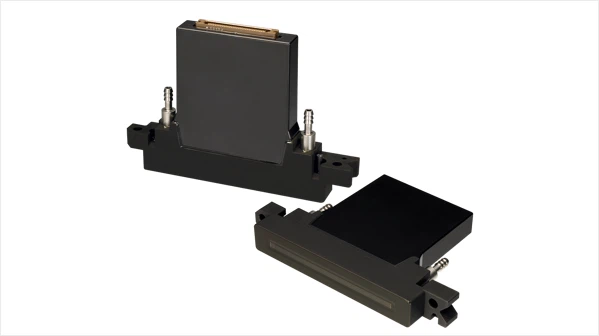
First off, let's talk a bit about the Konica 1024. It's a pretty popular inkjet printer print - head, known for its reliability and decent print quality. You can check out more details about it on our site here: Konica 1024.
Now, onto the main question. The short answer is yes, the Konica 1024 can print on glossy paper. But there are a few things you need to keep in mind.

Glossy paper has a smooth, shiny surface that can give your prints a high - end, professional look. It's often used for things like brochures, photos, and marketing materials. However, this smooth surface can also be a bit tricky for printers.
When it comes to the Konica 1024, it has the ability to lay down ink in a precise manner. The print - head is designed to create fine droplets of ink, which is great for achieving sharp and detailed prints on glossy paper. But the type of ink you use is crucial.
There are different types of inks available in the market, and not all of them are suitable for glossy paper. You need to use inks that are formulated to adhere well to the smooth surface of the glossy paper. For example, solvent - based inks or UV - curable inks can work really well with the Konica 1024 on glossy paper. Solvent - based inks penetrate the paper slightly and dry quickly, while UV - curable inks harden almost instantly when exposed to UV light.
Another factor to consider is the print settings. You may need to adjust the print speed, resolution, and ink density to get the best results on glossy paper. A slower print speed can allow the ink to be absorbed better by the paper, resulting in a more even and vibrant print. Higher resolution settings can make your images and text look sharper, but it may also increase the printing time.
Let's compare the Konica 1024 with another popular print - head, the Ricoh G5. The Ricoh G5 also has the capability to print on glossy paper, but it has its own set of characteristics. The Ricoh G5 might be a bit more suitable for high - volume printing jobs, while the Konica 1024 is often praised for its versatility and ability to handle different types of inks.
There's also the Konica 1024i, which you can learn more about here: Konica 1024i. The 1024i is an upgraded version of the Konica 1024. It has some improvements in terms of print quality and performance. When it comes to printing on glossy paper, the 1024i might give you even better results, especially in terms of color accuracy and detail.
Now, let's talk about some of the challenges you might face when printing on glossy paper with the Konica 1024. One of the main issues is ink smudging. If the ink doesn't dry properly or if you touch the print too soon, it can smudge and ruin your work. To avoid this, make sure you use the right type of ink and give the print enough time to dry.
Another challenge is color matching. Glossy paper can sometimes affect the way colors appear. The shiny surface can reflect light differently, making the colors look a bit different than what you see on your screen. You may need to do some color calibration to get the colors just right.
But overall, if you take the necessary precautions and use the right settings and inks, the Konica 1024 can produce some really amazing prints on glossy paper. Whether you're a small business owner looking to print high - quality brochures or a photographer wanting to print your best shots, the Konica 1024 can be a great choice.
If you're thinking about getting a Konica 1024 or have any questions about printing on glossy paper or any other aspects of the printer, don't hesitate to reach out. We're here to help you make the most of this great piece of equipment. Whether you're new to the printing game or a seasoned pro, we can offer you advice and support to ensure you get the best results from your Konica 1024. So, if you're interested in purchasing or have any queries, feel free to start a conversation with us. We're looking forward to helping you take your printing to the next level.
References
- General knowledge about inkjet printing technology and print - heads
- Product specifications of Konica 1024, Konica 1024i, and Ricoh G5